
6 AI Prompts Every Architect Needs in 2026

6 AI Prompts Every Architect Needs in 2026 | Innovxa

Turn sketches, floor plans, and construction-stage models into photorealistic, client-ready visuals in seconds – not days.

AI prompts for architects are changing how fast a design idea becomes a photorealistic, client-ready visual – no more hours of manual rendering or back-and-forth revisions. AI has changed that math entirely. With the right prompt, an architect can now turn a rough sketch, a 2D floor plan, or a bare structural frame into a photorealistic, presentation-ready render in a matter of seconds.

At Innovxa, we spend a lot of time testing which prompts actually produce usable, professional output for architecture teams – not just “AI slop.” Below are the six prompt templates we rely on most, exactly as we use them, along with what each one is genuinely good for and how to adapt it for your own projects

Why Architects Are Adding AI Prompts to Their Workflow

Before the prompt list, it’s worth being clear about where AI visualization actually helps in a real architectural workflow and where it doesn’t replace your process:

  • Client pitches and early-stage concept approval, where speed matters more than construction-document precision.
  • Design exploration, testing five façade materials or three landscape directions in the time it used to take to render one.
  • Marketing and leasing collateral for developments that aren’t built yet.
  • Internal design reviews, so stakeholders can react to something visual instead of a floor plan and a mood board.

AI renders are a communication tool, not a replacement for construction documentation, structural review, or code compliance – treat the output as a fast concept layer that still needs a licensed architect’s judgment behind it.

1. Exterior Concept Creator

Best for: turning a massing model or plain 3D volume into a fully styled exterior concept for early client presentations.

The Prompt

“Transform my residential exterior into a [Modern/Contemporary/Minimal/Scandinavian/Luxury] style while keeping the building structure unchanged. Add realistic façade materials, premium textures, landscaping, driveway, outdoor lighting, trees, vehicles, people, golden-hour lighting, and ultra-photorealistic architectural visualization suitable for client presentation.”
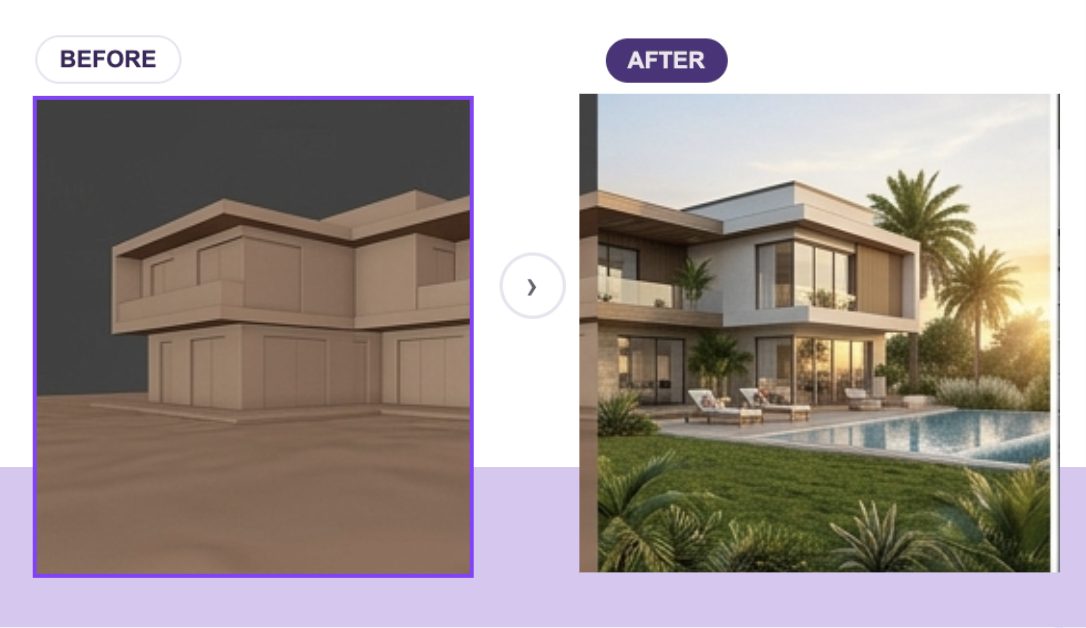
Photorealistic AI-rendered luxury residential exterior with landscaping and golden-hour lighting — Innovxa AI prompts for architects

How Architects Can Use It

  • Swap the bracketed style tag to instantly generate multiple design directions from the same massing model – useful for client workshops where you’re deciding on architectural language before committing to detailed drawings.
  • Keep the “structure unchanged” instruction locked, and only vary materials and style – this stops the AI from redesigning your actual building.
  • Use the output as a pitch-deck hero image, not a construction reference; treat it as a mood-setting tool for stakeholder buy-in.

2. Interior Concept Creator

Best for: converting a blank or grey-box interior model into a styled, furnished space for design approval.

The Prompt

“Redesign this interior into a [Modern Minimal/Luxury/Industrial/Classic] style using premium furniture, realistic materials, warm lighting, décor, indoor plants, natural daylight, and cohesive colour palettes while preserving the room layout. Create a photorealistic interior visualization.”
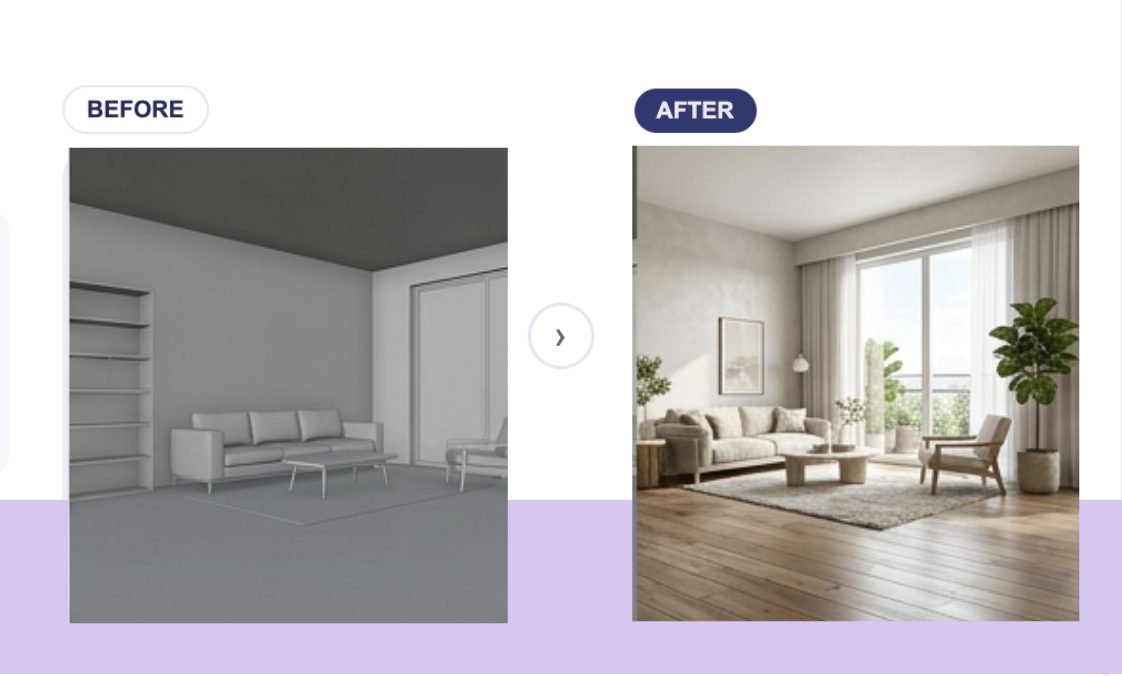
Photorealistic AI-rendered modern living room interior with furniture and natural daylight — Innovxa AI prompts for architects

How Architects Can Use It

  • Excellent for interior design handoff meetings – show a client three style directions for the same floor plan without committing to a single FF&E package yet.
  • Because the room layout is explicitly preserved, this prompt is safe to run on real project geometry (not just concept sketches), making it useful for renovation and retrofit proposals.
  • Pair this with your actual material and finish specs by naming brands or finish codes directly in the prompt for closer-to-real output.

3. BIM & Construction Visualizer

Best for: showing clients, investors, or lenders what an in-progress structure will look like once complete.

The Prompt

“Transform this construction-stage model into a completed photorealistic building with realistic façade materials, glazing, landscaping, lighting, roads, vehicles, people, and environmental context while preserving the original design.”
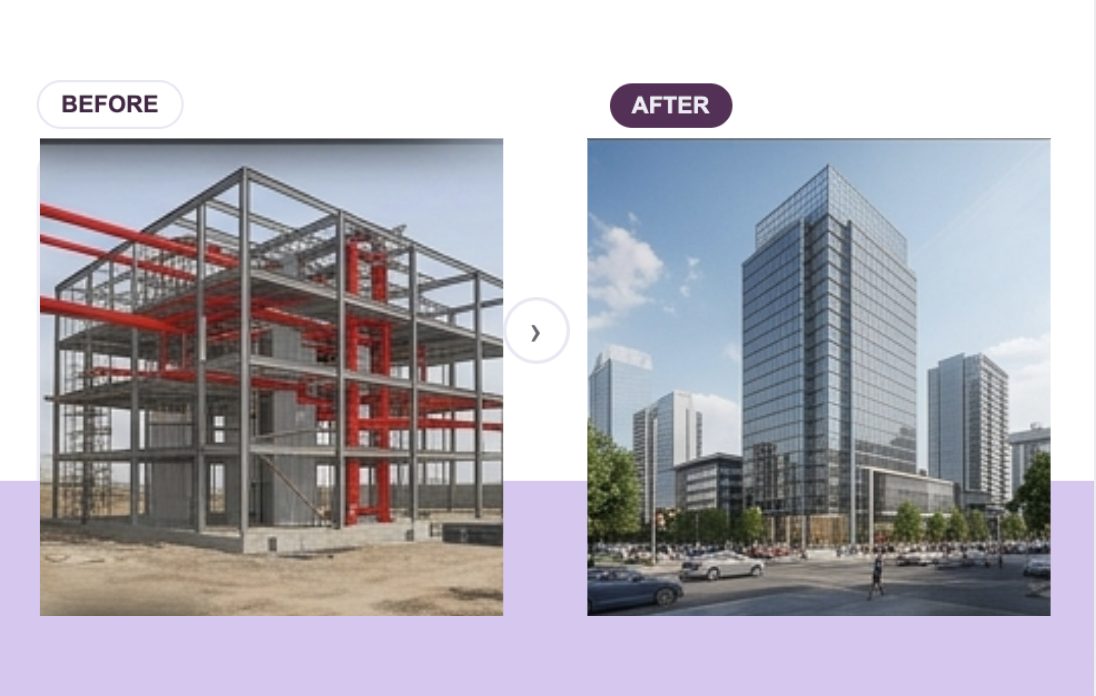
Completed photorealistic high-rise building with glazing and street context — Innovxa AI prompts for architects

How Architects Can Use It

  • Ideal for investor updates and construction-progress marketing, where a bare structural frame doesn’t communicate the finished vision.
  • Feed it a real BIM export or site photo of a steel/concrete frame – the more accurate the input geometry, the more trustworthy the finished render looks to stakeholders who already know the site.
  • Because it explicitly preserves “the original design,” this is one of the few AI-render prompts safe to send to a client who has already approved the design – it’s not reinventing the building, just finishing it visually.

4. Floor Plan to 3D Visualizer

Best for: giving a flat 2D floor plan spatial, furnished depth without modeling it in a full 3D suite.

The Prompt

“Transform this 2D architectural floor plan into a fully furnished 3D interior visualization with realistic furniture, flooring, lighting, décor, materials, textures, natural daylight, and accurate room proportions while preserving the original layout.”
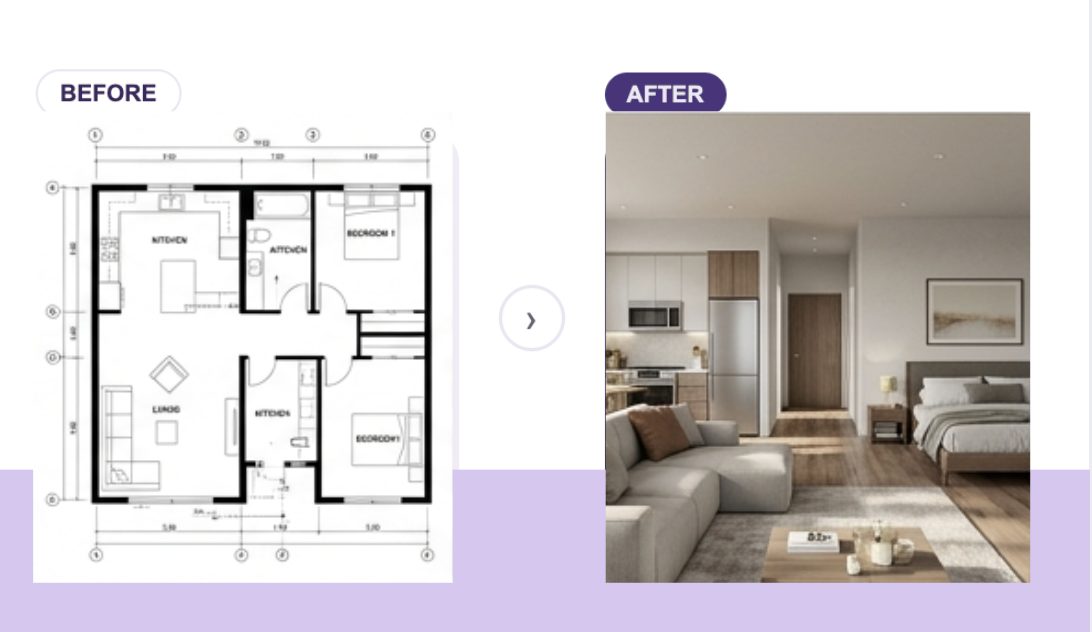
Fully furnished photorealistic 3D interior generated from a 2D floor plan — Innovxa AI prompts for architects

How Architects Can Use It

  • One of the highest-ROI prompts for residential and multifamily sales collateral – turn a unit plan into a sellable visual before a single unit is built.
  • Because layout accuracy is explicitly requested, this works well as a quick internal sanity check: does the furniture actually fit the way you assumed when you drew the plan?
  • Useful for space planning conversations with clients who struggle to read 2D floor plans – most non-architects understand a furnished 3D room instantly.

5. Landscape Design Generator

Best for: visualizing outdoor space, pools, and hardscaping without a separate landscape architecture render pass.

The Prompt

“Transform this outdoor space into a luxury landscape design with premium paving, lush greenery, decorative plants, trees, seating areas, ambient lighting, water features, pergolas, outdoor furniture, and realistic environmental details while maintaining the existing architecture.”
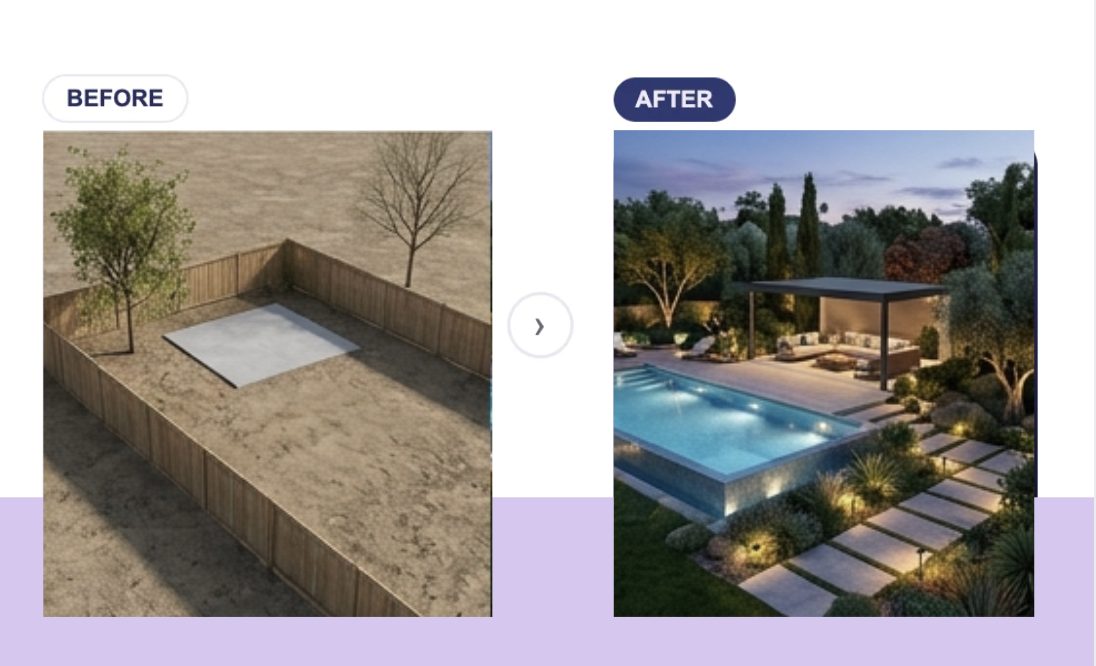
Luxury AI-generated landscape design with pool, lighting, and greenery — Innovxa AI prompts for architects

How Architects Can Use It

  • Strong for villa, resort, and high-end residential projects where outdoor living space is a major selling point but landscape design is often the last thing rendered (if at all).
  • Because the building itself is locked (“maintaining the existing architecture”), this prompt is safe to layer onto a render you’ve already approved for the structure – you’re only iterating on the exterior grounds.
  • Great for seasonal or golden-hour marketing variants of the same property – regenerate with different lighting and planting maturity to extend a single asset into a full content set.

6. Sketch to Photorealistic Render

Best for: early concept sketches that need to be pitched before any 3D modeling has happened.

The Prompt

“Transform this hand-drawn architectural sketch into an ultra-photorealistic building while preserving the original concept. Apply realistic materials, glass façades, premium textures, landscaping, environmental lighting, reflections, people, vehicles, and cinematic architectural rendering quality.”
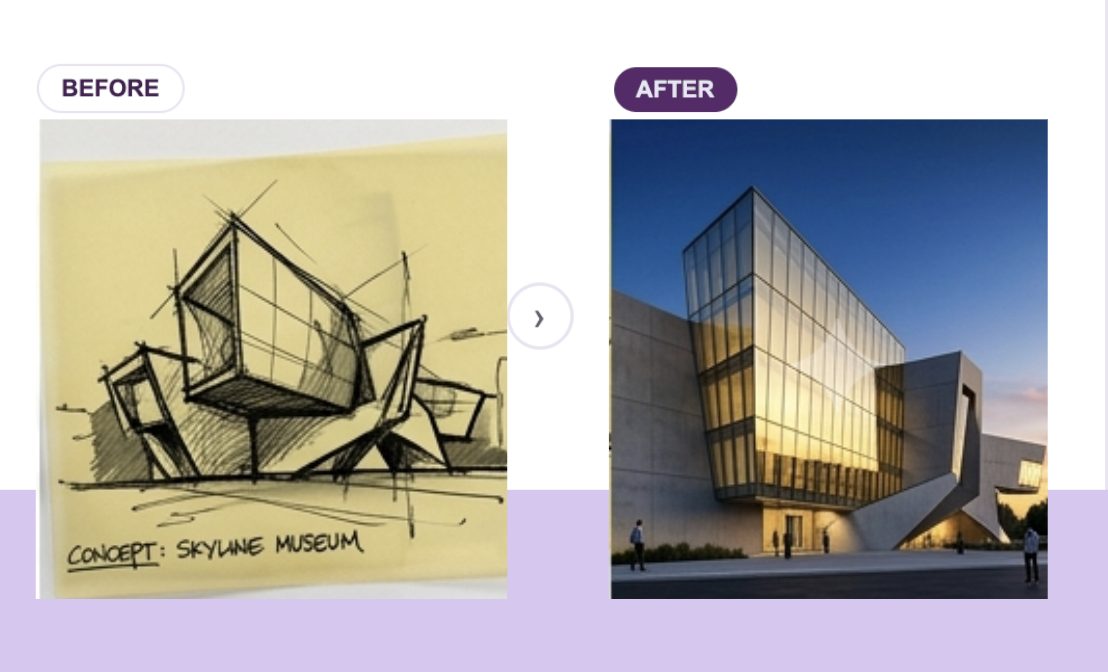
Ultra-photorealistic AI-rendered building generated from a hand-drawn sketch — Innovxa AI prompts for architects

How Architects Can Use It

  • The single best prompt for early-stage competitions and design pitches, where you need a compelling visual fast and don’t yet have a 3D model to work from.
  • Because it’s explicitly instructed to preserve “the original concept,” this is a good option when you want the AI to interpret your hand-drawing faithfully rather than inventing its own design – critical for design competition submissions where the concept itself is being judged.
  • Combine this with the Exterior Concept Creator (#1) once you’ve locked a direction – sketch first for concept approval, then generate refined material/style variations from the same base idea.

How to Get Better Results From Any of These Prompts

  • Be specific about what must stay fixed – structural form, room layout, or design concept  so the AI edits rather than reinvents your work.
  • Name real materials, finishes, and lighting conditions instead of generic terms; “brushed limestone cladding at golden hour” outperforms “nice materials, good lighting” every time.
  • Iterate in small changes. Swap one variable (style, lighting, season) per generation so you can actually compare outputs against each other.
  • Treat every output as a concept visual, not a construction document – verify materials, dimensions, and code compliance separately.

Bring These Prompts Into a Real Workflow

Prompt libraries are a great starting point, but pasting text into a generic AI image tool one render at a time doesn’t scale across a real project pipeline. Innovxa’s platform is built specifically for architecture teams who need to go from BIM model or floor plan to photorealistic, client-ready visuals – consistently, on brand, and at project scale.

Book a demo for your firm →


Frequently Asked Questions

What are AI prompts for architects? AI prompts for architects are structured text instructions used with AI image-generation tools to turn architectural inputs – sketches, floor plans, BIM models, or massing studies – into photorealistic renders, without manually building and lighting a 3D scene.

Can AI-generated renders replace traditional architectural visualization? For early concept, marketing, and client-approval visuals, AI renders can significantly cut down time and cost. For construction documentation, code compliance, and detailed technical drawings, traditional CAD/BIM workflows and licensed review are still required.

Which AI tools work best for architectural rendering prompts? Results vary by tool and model version. What matters most is prompt specificity — locking down what should stay unchanged (structure, layout, design concept) while giving detailed direction on style, materials, and lighting.

Is it legal to use AI-rendered images in client presentations? Yes, as long as you’re transparent that the image is an AI-assisted concept visualization rather than a final construction rendering, and you have rights to any input images (sketches, BIM exports, site photos) you feed into the tool.

How is Innovxa different from a generic AI image generator? Innovxa is purpose-built for architecture and real estate visualization, so prompts are tuned for accurate structural preservation, realistic materials, and client-presentation quality rather than generic AI art.

 Explore our Construction & BIM Solutions or Contact us today to start a conversation.