
Why “best headset” is the wrong question in 2026
XR has matured past the demo phase. Most teams aren’t looking for a “wow” moment anymore—they need:
- Fewer coordination errors
- Faster design reviews
- Clearer stakeholder alignment
- Better training outcomes
- Less travel and fewer rework cycles
That means evaluating XR like a workstation tool, not a consumer gadget.
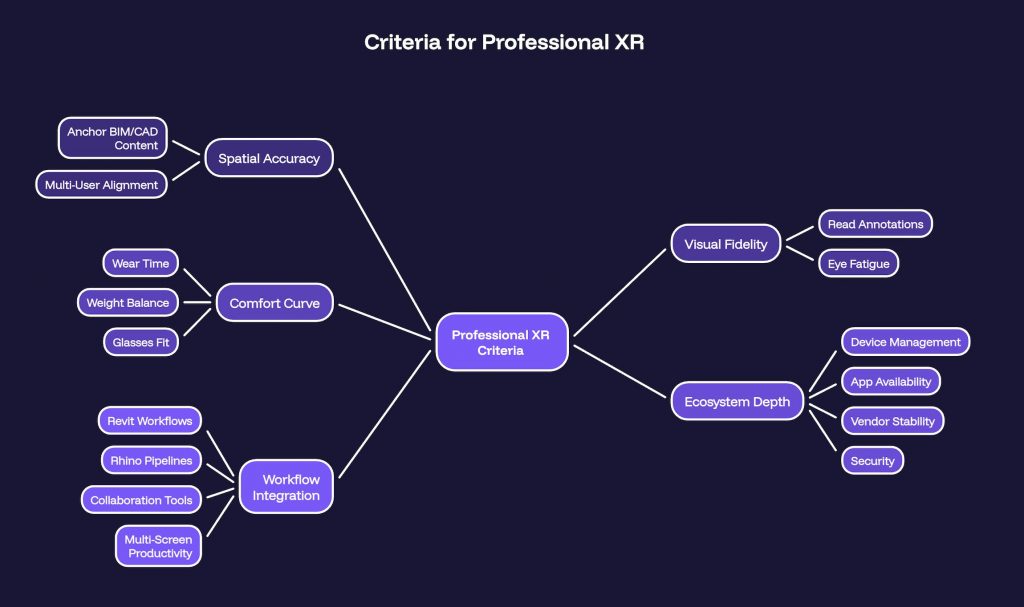
The 2026 XR landscape (work-first view)
Below is a practical lens on the most common XR categories used in professional environments.
Meta Quest 3 — the workhorse for scalable adoption
Best for: BIM coordination, design reviews, training, multi-user workshops
Why it works:
- Strong ecosystem and broad adoption
- Good balance of price, performance, and usability
- Practical for teams running repeated sessions
Trade-offs to consider:
- Not the absolute best visual fidelity on the market
- You’ll want a clear process for device management if scaling across teams
Mindset: “We want XR to become a repeatable workflow, not a one-off demo.”
PICO XR 4 Ultra — the enterprise deployment builder
Best for: structured enterprise rollouts, simulation/training programs, standardized hardware fleets
Why it works:
- Strong consistency for IT-managed environments
- Designed for enterprise scenarios where predictability matters
Trade-offs to consider:
- Smaller ecosystem compared to Meta
- Depending on region, app availability and vendor support can vary
Mindset: “We want an XR system that behaves like corporate infrastructure.”
Apple Vision Pro — premium spatial computing for high-fidelity review
Best for: high-end visualization, executive walkthroughs, premium review experiences, Apple-centric workflows
Why it works:
- Exceptional visual clarity and display quality
- Seamless integration if your work environment is already Apple-heavy
Trade-offs to consider:
- Fewer BIM/engineering-native tools (today)
- Higher cost makes it harder to scale across an entire project team
Mindset: “We want the clearest visual layer for decision-makers and high-stakes reviews.”
AR Glasses (category) — the future secondary-screen layer (not yet a workstation)
Best for: travel, lightweight productivity, quick information overlays, limited-duration tasks
Why it’s promising:
- Lightweight and portable
- Strong potential as a companion device for field workflows
Trade-offs to consider:
- Not yet a full replacement for design workstations
- Many use cases still depend on companion devices and narrow app support
Mindset: “A productivity companion—not the main device.”
Simple decision matrix (choose based on your workflow)
Use this as a fast starting point:
- BIM + construction coordination → Meta Quest 3
- Enterprise simulation + training at scale → PICO XR
- High-end visualization + Apple ecosystem → Apple Vision Pro
- On-the-go productivity and lightweight overlays → AR glasses
What most teams miss: your headset is not your strategy
By 2026, the winners aren’t the teams with the “best headset.”
They’re the teams with the best XR workflow integration strategy:
- Clear use cases (design review, coordination, training, stakeholder alignment)
- Repeatable session formats (agenda, facilitation, outputs)
- File preparation standards (model size, level of detail, annotation rules)
- Deployment plan (device management, onboarding, support)
- Success metrics (time saved, errors reduced, decisions accelerated)
XR succeeds when it fits into the pipeline like a digital extension of the workspace.
Quick self-check before you buy
If you want a decision that will hold up in real projects, ask these five questions:
- What specific workflow will this improve in the next 30 days?
- Who will use it weekly (not “someday”)?
- Which tools must it integrate with (BIM/CAD/PM/collaboration)?
- What does a successful XR session produce (actions, decisions, sign-off)?
- How will we scale from 1 device to 10+ devices without chaos?
Ready to bring XR into your design workflow?
At Innovxa, we help AEC and construction teams implement the right XR setup — from headset selection and BIM integration to deployment, training, and ongoing support.
Whether you’re evaluating your first device or scaling across a full project team, we’ll help you build a workflow that actually sticks.
Talk to our team: https://www.innovxa.com/contact-us/
Immersive BIM Solutions: https://innovxa.com/services/construction-bim-solutions/
Great content! Keep up the good work!